
Why Windows is the hardest passkey surface in 2026 and what Entra admins should expect
On this page
Written by: Corbado
If you have rolled out passkeys to a mixed device fleet, you might have probably noticed the following pattern. Some users log in smoothly and barely create a ticket (e.g. iPhone users), while others, like Windows users, do. Behind runs the same identity provider, same policy, same relying party but the user experience with passkeys can be very different depending on the user’s setup.
We’ve been measuring this across a large set of real sign-ins and the pattern is consistent enough to say, that Windows is the platform where passkey logins fail most often or have the lowest login rate of any major operating system in 2026.
In the following, we’ll share more detailed insights on what we’re seeing and what this means if you’re planning your passkey rollout.
Let’s start with a few definitions so we’re working from a common understanding:
- Passkey enrollment rate: of all users offered to create a passkey, the share who complete the passkey registration successfully.
- Passkey usage rate: of all successful logins, the share that actually is done with a passkey.
- Passkey login success rate: of all users who start a passkey login, the share who finish on the first try, without retries or password fallback.
Short note on the numbers first: They come mostly from customer identity (CIAM) rollouts, but the patterns show up in workforce deployments, too, so the takeaways hold either way.
The first-try login gap: Windows 45-60%, iOS 85-95%#
Let’s compare the first-try passkey login success rate on the web [1]. The spread by platform is considerable.
- iOS sits at 85 to 95%.
- Android and macOS land in the 70 to 85% range.
- Windows, both 10 and 11, sits at just 45 to 60% (so it’s in some cases half the success rate compared to other platforms).
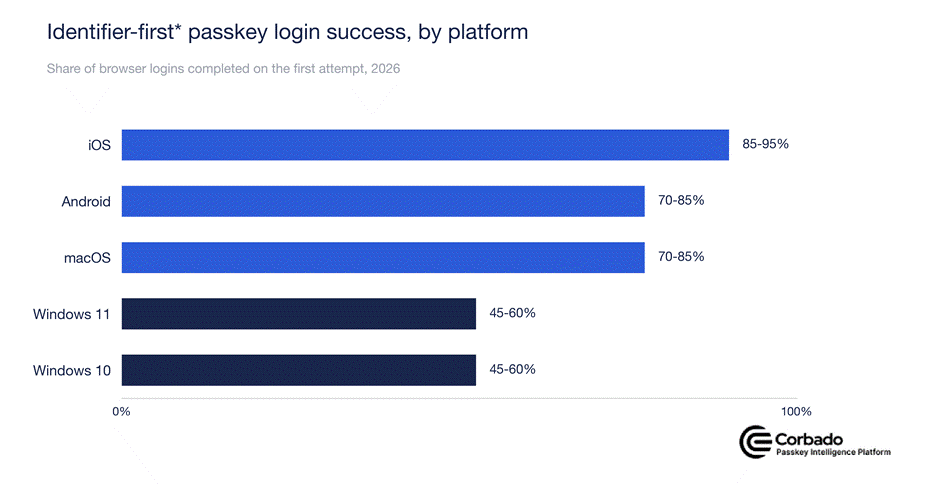
**Identifier-first: the user enters their email or username, then signs in with the matching passkey. Source: Passkey Benchmark 2026, corbado.com/passkey-benchmark-2026.*
A meaningful share of Windows users who begin a passkey login do not finish on the first try and fall back to a password or another login method. The reasons behind can be split into three things stacked on top of each other.
Reason 1: Windows Hello is not a conditional create path#
On iOS or Android, many passkeys are automatically created in the background via Conditional Create. A user signs in with an autofilled password from the password manager and right after that, the a passkey is created in the background (if the site / app has implemented it correctly). This is called Conditional Create and it is how you drive passkey enrollment without running a campaign.
On Windows, this path is effectively available only in a specific setup: Chrome with Google Password Manager. That means Conditional Create can work well for users in that environment. However, many Windows users rely on Windows Hello, Microsoft Edge, enterprise-managed browsers, third-party password managers or restricted corporate devices, where this flow is not consistently available. As a result, Conditional Create should be seen as a useful Windows path where supported, but not as the main Windows enrollment strategy. Explicit prompts and guided setup flows are still needed, especially for Windows Hello users.
The Passkey Benchmark 2026 shows this clearly at enrollment. First time passkey enrollment on iOS web reaches up to 83%. On Windows web it sits at just 25 to 39%. That is the difference between adoption that happens on its own and adoption you have to drive. If your enrollment numbers look great on mobile and flat on Windows, this could be a reason why.#
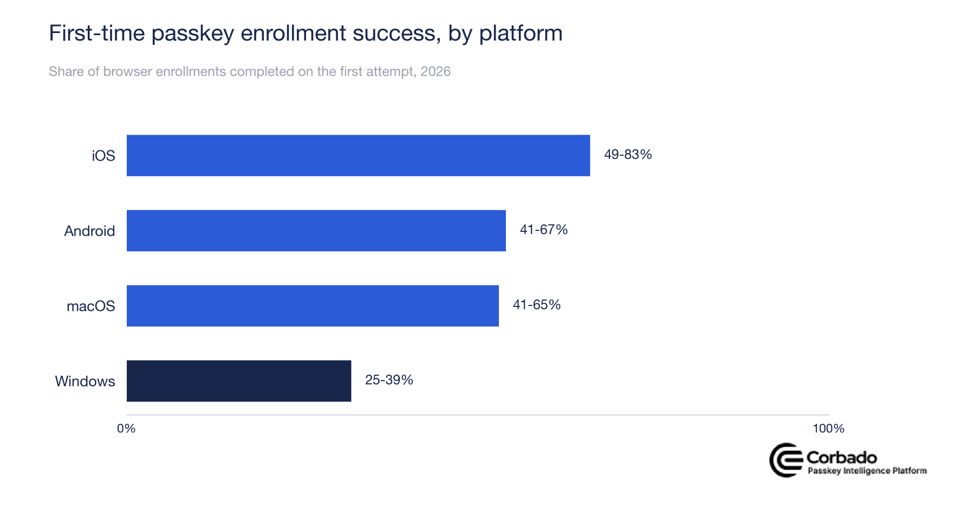
Source: Passkey Benchmark 2026, corbado.com/passkey-benchmark-2026.
Reason 2: the QR code detour hits 55 to 65% of Windows logins#
The second issue appears when a user has a passkey which is stored on their mobile phone. They start the sign in on the desktop (Windows). Unexpectedly to many, the browser on Windows shows a QR code on screen, the user scans it with their phone and the phone authenticates over hybrid transport, so that the desktop session completes. The login works, but only after a detour most users never asked for.
Across deployments, on Windows 11, 55 to 65% of every successful identifier-first passkey login is actually a bridge to a phone. On Windows 10 it is 40 to 55%. On iOS, cross-device usage sits at 0 to 5% because the passkey is most of the times available on the device where the user is logging in from.
Cross-device authentication works and it is secure. But it is friction. It turns a one-tap login into a multi-device process and every extra step is a place where a user might give up and potentially decides to use a password instead.
The good news is that this detour is front-loaded. It mostly hits the first login on a new device, when the browser does not yet know which credential to offer. Once the device is recognized and a local passkey was created on this device, the QR step can be avoided and the login looks like any other passkey login.
The numbers below make that split visible. First logins on Windows land in the 45 to 60% success band. Returning logins on the same device climb to 95 to 99%, the same range as mobile.
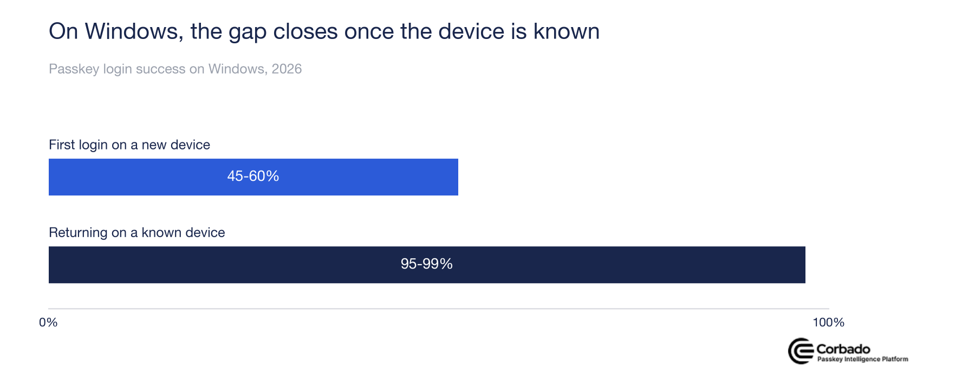
Source: Passkey Benchmark 2026, corbado.com/passkey-benchmark-2026.
Reason 3: the desktop surface is fragmented#
Mobile is essentially two platforms with two well-behaved authenticators (Google Password Manager and Apple iCloud Keychain). Windows is not. You have different browsers, different versions, hardware that may or may not have a usable biometric sensor, security keys and Windows Hello, all exposing slightly different capabilities to the relying party. The result is that the same server-side implementation that runs cleanly on iOS can hit more edge cases on Windows and each edge case could cost you a few percentage points of the passkey login success rate.
What this means for an Entra CIAM passkey rollout#
Passkeys in Entra are mostly for workforce today and Microsoft is expanding the picture toward external identities. A lot of teams are already preparing to offer passkeys to their customers, not only to their employees. That changes the stakes. An employee might tolerate a clunky flow because IT told them to. A customer will not. They might just leave.
Here are a few specific expectations if you are planning that rollout:
- Start your pilot on Android and iOS, then move to Windows: Pilot on mobile, where the numbers are good and treat Windows as the surface you have to actively support.
- Plan the fallback as a feature, not an afterthought: A clean password or email fallback (+ MFA) to provide a strong alternative in case passkeys do not work as expected
- Drive Windows enrollment explicitly: Not all Windows devices have Windows Hello enabled or the required hardware (e.g. Trusted Platform Module). Some users may also still be on older operating systems (e.g. Windows 7). As a result, the JavaScript API check PublicKeyCredential. isUserVerifyingPlatformAuthenticatorAvailable() often returns lower availability on Windows than on other operating systems. In addition, many desktop users are still less familiar with biometric login than mobile users, although this is changing. Windows also has a more heterogeneous mix of OS versions, browsers and credential managers. This makes the passkey UX less predictable than, for instance, in the Apple ecosystem. For that reason, Windows enrollment should be guided explicitly rather than treated as a passive prompt.
- Instrument the QR code path and watch the trend: Track what share of your Windows logins goes cross-device and how that number moves over time. A rising trend is your signal to act and you want to see it in your own data, not in a stack of support tickets.
The takeaway#
None of this is a reason to skip passkeys. The benefits (phishing resistance, better UX in general, cost savings) outweigh the disadvantages. The adoption numbers for mobile devices are strong and often pay the project alone. But Windows needs its own plan. If you size the rollout assuming Windows behaves like iOS, the helpdesk tickets will correct you. If you plan for the gap, you can ship passkeys on Windows in 2026 with your eyes open.
The full platform data sits in the Passkey Benchmark 2026 if you want to check the numbers against your own fleet.
[1] Data from Passkey Benchmark 2026.
Comments
Comments load when you scroll here.