
Prevent users from creating new agent identity blueprints
Starting 4 November 2026, every user without an Entra role can create agent identity blueprints in your tenant, unless you turn it off first.
Microsoft announced this on 13 October in MC1506733 - Action may be required: Review who can create agents in Microsoft Entra. Rollout starts in early November and should finish by late November 2026.
You can set the toggle today. Your choice applies when the rollout reaches your tenant.
Why this matters#
A blueprint is the template from which agent identities are created. It holds the credentials, and every agent identity created from it authenticates through it. Think of it as an app registration built for agents.
Most of us switched off “Users can register applications” years ago for good reasons: shadow apps, credentials nobody owns, and consent sprawl. Blueprints carry the same risks.
The catch: this new setting is independent of “Users can register applications”. If you blocked app registrations, that does not block blueprints. Review both settings separately.
Where the setting lives#
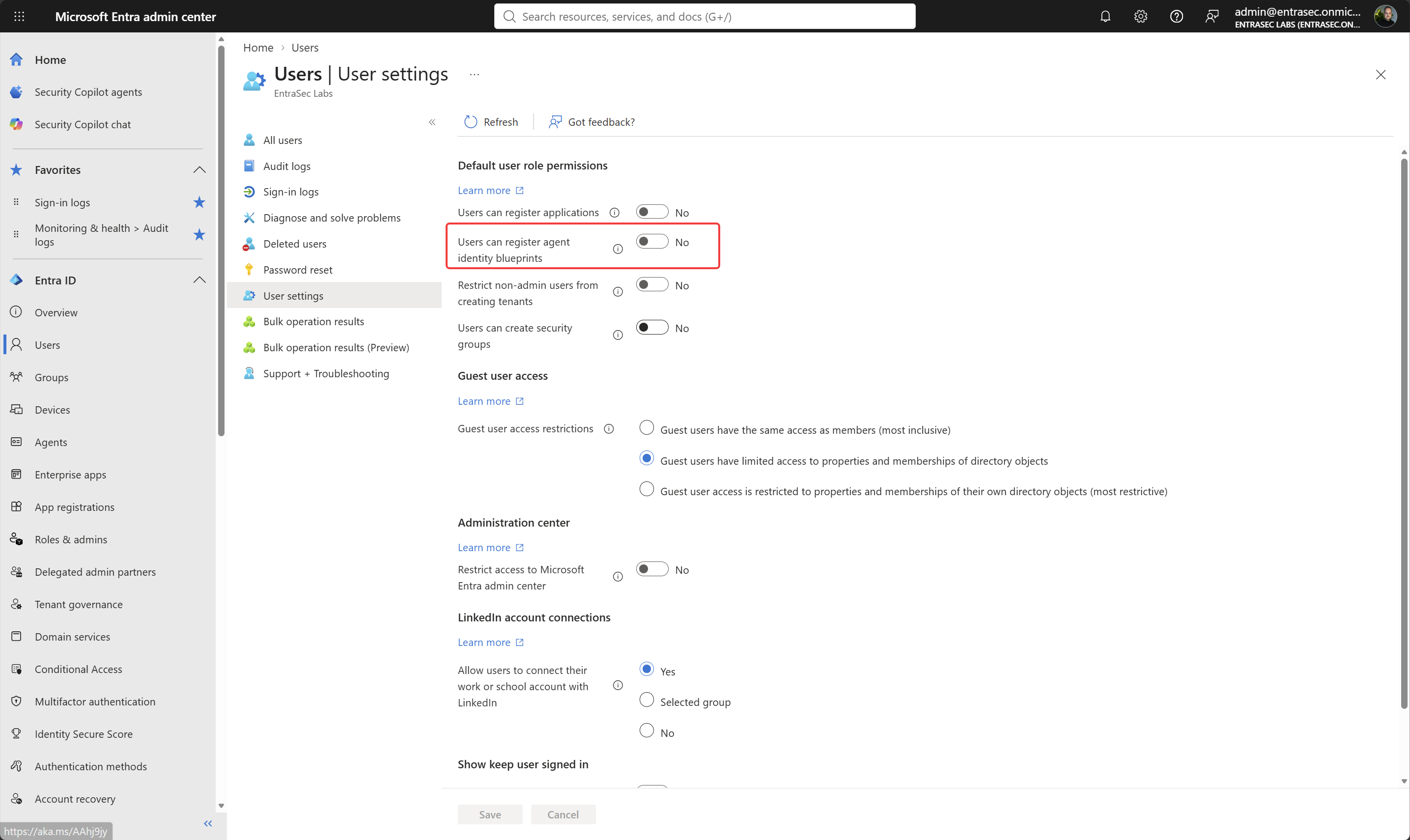
In the portal, it’s called Users can register agent identity blueprints, under Entra ID > Users > User settings > Default user role permissions, right below “Users can register applications”. The Message Center post calls it “Users can create agent blueprints”, but the portal uses the name above.
In Graph, it’s a new property in the authorization policy, defaultUserRolePermissions.allowedToCreateAgentIdentityBlueprints. For now, it only shows up on the beta endpoint. v1.0 doesn’t return it yet.
GET https://graph.microsoft.com/beta/policies/authorizationPolicy"defaultUserRolePermissions": {
"allowedToCreateApps": false,
"allowedToCreateAgentIdentityBlueprints": false,
"allowedToCreateSecurityGroups": false,
"allowedToCreateTenants": true,
"allowedToReadBitlockerKeysForOwnedDevice": true,
"allowedToReadOtherUsers": true
}Reading it requires Policy.Read.All.
How to change the setting#
In the portal:
- Sign in to the Microsoft Entra admin center as at least a Cloud Application Administrator.
- Go to Entra ID > Users > User settings.
- Under Default user role permissions, set Users can register agent identity blueprints to No.
- Save.
With Graph (requires Policy.ReadWrite.Authorization):
PATCH https://graph.microsoft.com/beta/policies/authorizationPolicy/authorizationPolicy
Content-Type: application/json

{
  "defaultUserRolePermissions": {
    "allowedToCreateAgentIdentityBlueprints": false
  }
}
Who can still create blueprints#
With the toggle on No, creating a blueprint becomes a role you hand out, not a default every user has. This is where the governance work happens.
| Who | What they can do | Governance note |
|---|---|---|
| Agent ID Developer | Create blueprints and blueprint principals. Becomes owner of what they create. Can add federated credentials. | The least-privileged way to let builders build. Assign it to named people, not to everyone. |
| Agent ID Administrator | Manage all agents in the tenant. The only Agent ID role that can add a secret or certificate to a blueprint. | Credentials on a blueprint flow to every agent identity built on it. Treat this role like Application Administrator. |
| Blueprint owners | Create agent identities from their own blueprint, without an Agent ID role. | Ownership is effectively permission, so review owners regularly. |
Apps with Graph permissions such as AgentIdentityBlueprint.Create | Create blueprints without a signed-in user. | The toggle does not block apps. Check which apps hold these permissions. |
To find out who holds the Agent ID roles, query one role at a time (the filter doesn’t accept two role IDs):
GET https://graph.microsoft.com/v1.0/roleManagement/directory/roleAssignments?$filter=roleDefinitionId eq 'adb2368d-a9be-41b5-8667-d96778e081b0'&$expand=principal($select=id,displayName)Use adb2368d-a9be-41b5-8667-d96778e081b0 for Agent ID Developer and db506228-d27e-4b7d-95e5-295956d6615f for Agent ID Administrator. That query returns active assignments only. Check roleEligibilitySchedules as well if you use PIM.
Comments
Comments load when you scroll here.