
From WordPress to Hugo on Cloudflare
On this page
janbakker.tech is now running on Cloudflare, and that was long overdue. When I started my blog in 2021, I picked what I knew at that time, and what most of the other community members did: WordPress. That worked fine for all that time, with no big issues. Yet, it became slow and expensive, so I wanted to move it away.
In this post, we talk more about that project, as it might help others who struggle with the same.
Why I left WordPress#
As I said, WordPress works great. It was spun up in a few minutes, and after picking a template and doing some groundwork, the site was happily sitting there for over 5 years. I registered my domain at Vimexx, a Dutch company that was one of the cheaper platforms (at that time). After a good year, I remember my website became a bit slow, so I decided to upgrade to the highest tier. That did not help. Most of the time, that has to do with plugins, but I did not find the time and the energy to troubleshoot that. So I kind of lived with that.
Then, out of the blue, I kept getting random 503 messages.

So I raised a support ticket, but Vimexx wasn’t very helpful there. They kept telling me that it was because of “high bot traffic”, but I did not buy that. Also, I did not want to spend too much time on it, so I decided it was time to move away from WordPress (and Vimexx, but more on that later).
To be honest, I tried this before. I think it was last year. I tried to move everything over to static pages on GitHub. The site was live, all my posts were there, but they looked horrible. So I dropped it there, thinking I was never going to make it. I even considered starting from scratch and forgetting about the current posts.
Also, when I was looking into moving, I realized I was paying roughly €500 per year to keep the site running:
- janbakker.tech domain
- hosting (max tier)
- WordPress template
- SEO subscription
Also, during all those years, I’m really surprised my site did not get hacked. We all know how vulnerable WordPress is these days, and I’m glad I kept it running all those years.
The new stack#
Together with Claude, I came up with the new structure. The new site is pure static pages on a Cloudflare Worker, built on Hugo, and the code is stored in a private repo on GitHub.
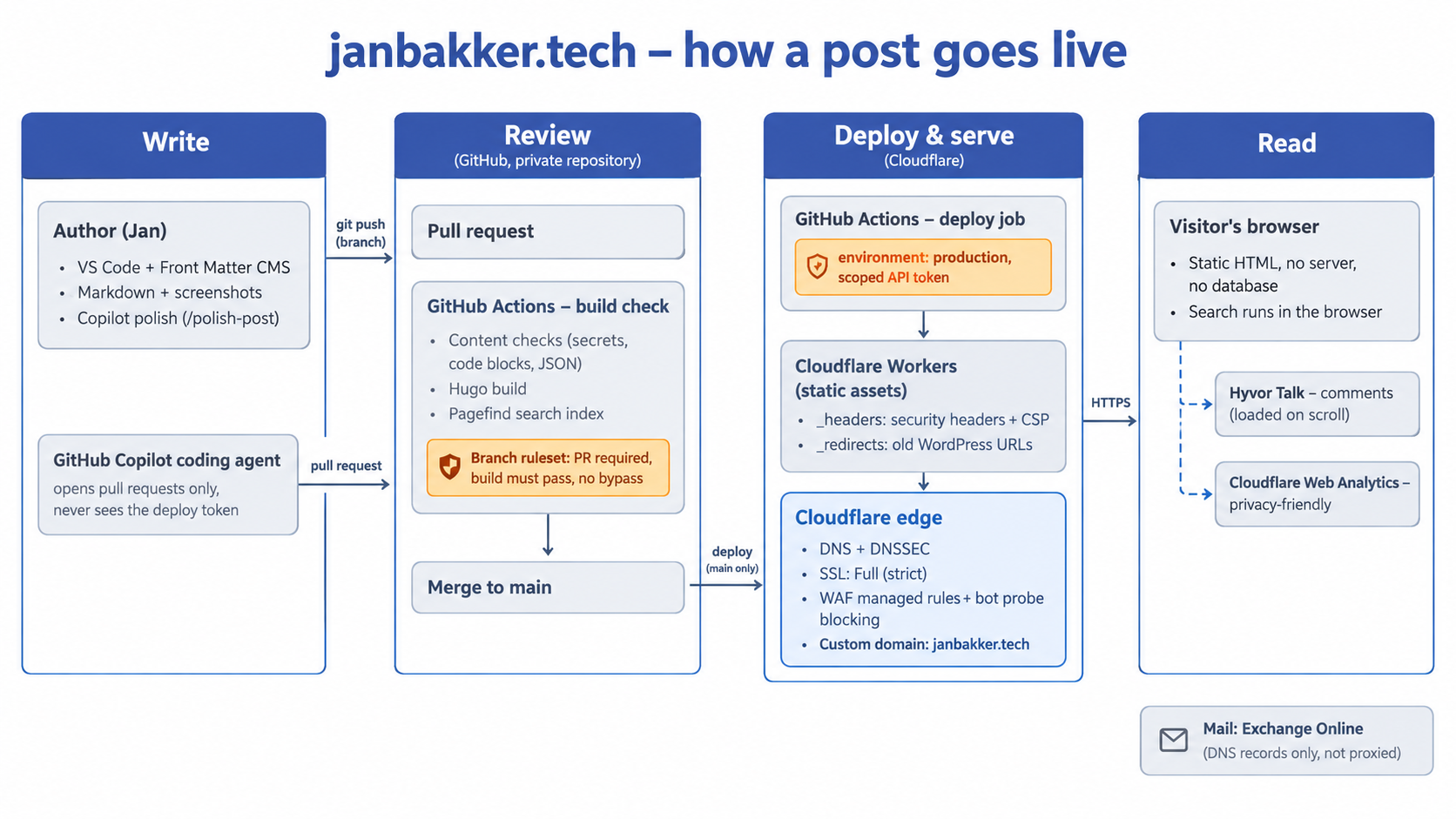
The only thing that changes for me is that I need to write my posts in Markdown, which takes a bit more effort, but as I am typing this, I’m already confident this is the way. I use Visual Studio Code and the Front Matter CMS plugin, where I can just start drafting and paste in my images. I only need to figure out a few Git commands to get the structure in place, but in the next few weeks, I’m going to focus on the automation part. A few things can be automated to make it easier for me. I still want to provide the content as a human, but AI will help me polish the drafts, scale the images, and prettify the code blocks, etc.
Converting 203 posts with AI#
After a few years of blogging, I got over 200 posts sitting in WordPress. Converting those to Markdown is a tricky part of the migration. They have a lot of images, videos, code blocks, comments, and links.
Here is how I (we) did it:
I exported the existing content from WordPress, including the wp-content/uploads folder with all the images. Claude Cowork then created a converter in Python using BeautifulSoup and markdownify. For every post, it:
- Created a separate folder structure.
- Copied the images from the source folder.
- Turned code blocks into Markdown code blocks and set the language.
- Converted image galleries, YouTube embeds, and tables.
- Cleaned up leftovers from WordPress plugins that I used.
I specifically asked to delegate some tasks to GitHub Copilot, so Claude made tasks to polish the posts:
- Cleaned up leftovers.
- Fixed code blocks that Claude Code did not identify.
- Put AI-generated alt text on all images.
- Wrote redirects for old WordPress URLs.
Comments (must have)#
A valuable part of having a website is the comments. They teach you a lot and keep me honest. For the comments, I’m currently using Hyvor Talk. It is easy to set up and configure, and it has an import feature for all existing WordPress comments, so all comments are migrated. It’s not free, but I think it adds value, so I’m happy to pay a little money.
I’ve considered using Giscus (free), but I think it’s important to let folks comment without having to sign up. Hyvor supports guest comments, which are also used in WordPress. So keep them coming, y’all!
Moving domain and DNS#
At this moment, the domain is pending transfer, so that will be moved later this month. I’ve transferred all of my DNS records to Cloudflare as I onboarded the domain. Before that, I had to disable DNSSEC first and wait some hours before setting my nameservers to Cloudflare. That went smoothly, as the TTL was only 10 minutes for each record, so as far as I could see, that went smoothly. Email kept running, as my MX records were imported just fine, and I had a few other CNAME records to check.
Results#
I’m pretty happy with the results. The website loads incredibly fast, and all my content looks good. It’s not entirely free, so in full transparency, these are the costs at the moment:
- €50/year for Hyvor Talk (comments)
- €50/year for janbakker.tech domain (using Cloudflare)
- €120/year for Cloudflare Pro (perhaps a bit overkill for a static Worker, so I might scale down later)
- €0/year for GitHub (Copilot)
I dropped my SEO subscription, so I need to find out what that does with the findability on Google and AI. On the other hand, I can also improve my content using GitHub Copilot by updating keywords and so on. That’s for a later post, I guess.
So, not entirely free, but for €220/year janbakker.tech is running properly and fast. I should also mention GitHub Copilot is an MVP benefit, so I can use that for free for the time being.
How I write a post now#
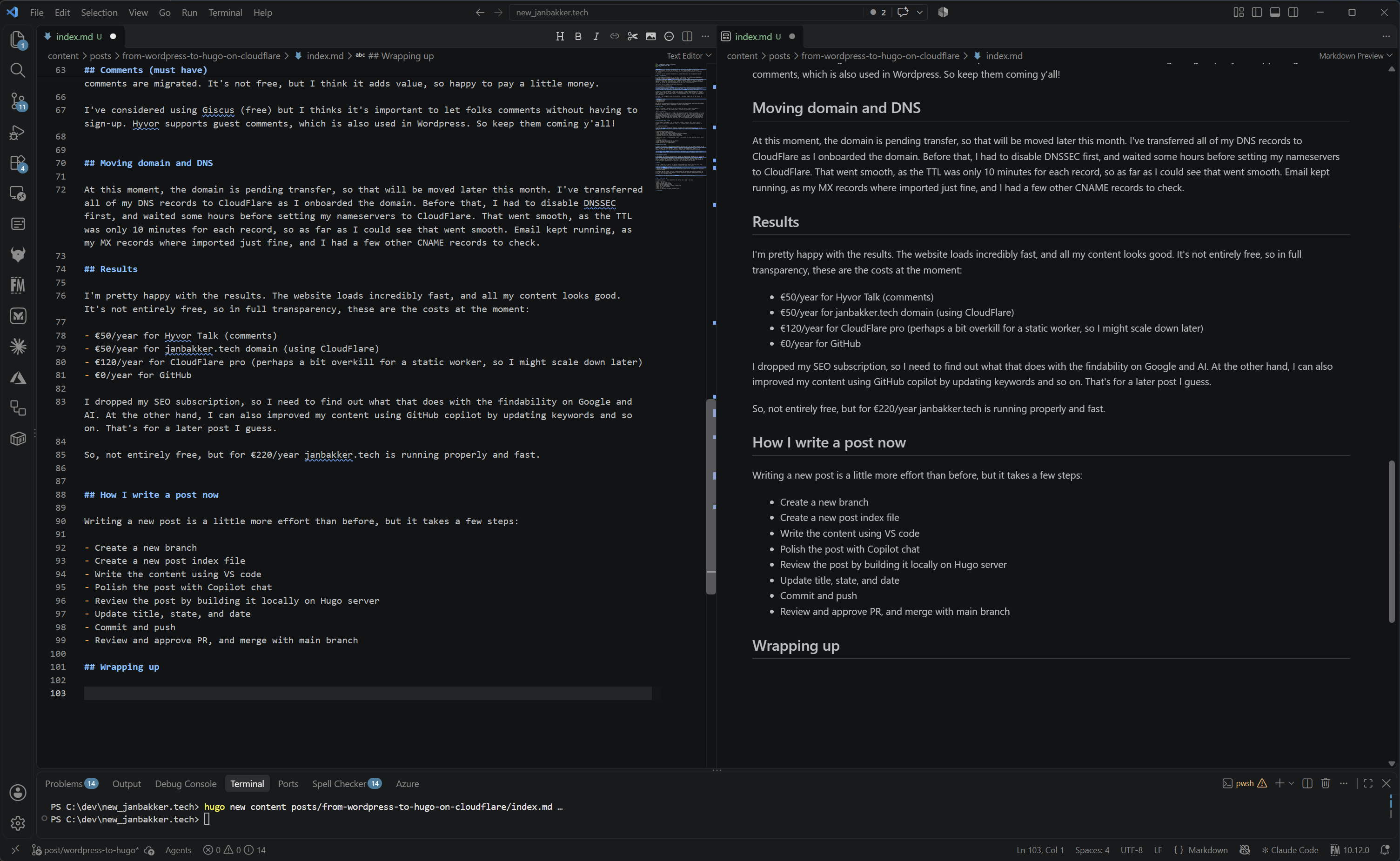
Writing a new post is a little more effort than before, but it takes a few steps:
- Create a new branch.
- Create a new post index file.
- Write the content using VS Code.
- Polish the post with Copilot Chat.
- Review the post by building it locally on the Hugo server.
- Update the title, state, and date.
- Commit and push.
- Review and approve the PR, and merge with the main branch.
It might take a while to get used to it and learn, but with preview enabled, it’s almost like using the WordPress editor.
Wrapping up#
All in all, the transition went smoothly, so I’m a happy bloke. I’m still challenging AI from time to time to improve things like security and build time, but for now it runs stably. If you have questions, suggestions, or comments, feel free to reach out.
Stay safe.
Comments
Comments load when you scroll here.