
Entra ID telephony providers for SMS and voice MFA: first look
What was announced#
Microsoft has published the first documentation for Choose Your Own Telephony Provider in Entra ID, together with an FAQ that might answer some of your questions. It is the answer to one question many of us have been asking: what happens to users who really need SMS or voice MFA once Microsoft stops delivering those messages itself?
The short version: you bring your own telephony provider, bought through the Microsoft Security Store, and Entra ID routes SMS and voice requests to it through a routing function that you run in your own Azure subscription.
This matters because Microsoft-provided SMS and voice delivery is being retired. From February 1, 2027 it stops for most users, and from July 1, 2027 for Global Administrators and external users. If you still have SMS or voice users after that date and no provider configured, they will be forced into passkey registration at sign-in.
How it works#
Entra ID keeps doing what it does today: it enforces your authentication methods policy and runs the sign-in experience. What changes is who delivers the SMS or the call. That is now your provider, and the traffic goes through a component in your tenant.
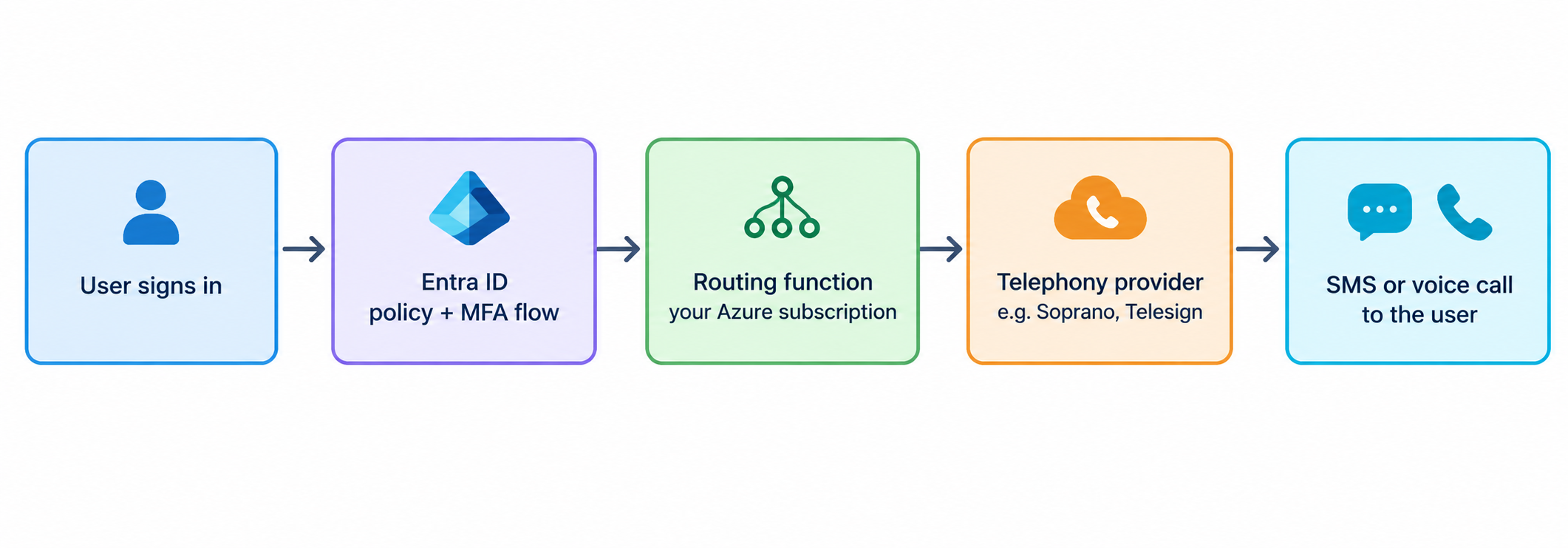
The FAQ describes the migration in five steps:
- Pick a supported provider and set up an account with them.
- Deploy the routing function in your Azure subscription.
- Scope the users or groups that use the provider for SMS, voice or both.
- Test with evaluation mode. Requests are routed to the provider, but users still get their codes through the current delivery method.
- Roll out gradually to production traffic.
A few details worth knowing:
- You can configure one provider per channel: one for SMS and one for voice.
- Soprano and Telesign are the first providers in the private preview. More should follow by general availability.
- It is Entra ID only. External ID and Azure AD B2C are not included.
- It does not save SMS sign-in as a primary method. That retirement goes ahead regardless.
One note on terminology: the docs only talk about a “routing function”. I expect this to be an Azure Function App, but Microsoft has not published the deployment details yet, so treat that as an assumption for now.
What it will cost you#
This is no longer included in your Entra licence. You pay for two things:
| Cost | Who bills you | What the docs say |
|---|---|---|
| Telephony provider | The provider, via Microsoft Security Store | Based on the provider’s pricing and your usage. Detailed pricing follows from September 18, 2026. |
| Routing function | Microsoft, as normal Azure consumption | Standard Azure charges. Microsoft says these costs are “expected to be minimal for most customers” compared to the provider charges. |
So the routing function is probably the small part of the bill. The provider contract is the real cost, and it’s one you now own: procurement, the agreement, and the relationship with the vendor.
There is also a hidden cost that no price list shows: someone in your team now has to own and monitor an Azure resource that sits in the MFA path.
Timeline and FAQ highlights#
The dates you need, newest first:
| Date | What happens |
|---|---|
| July 1, 2027 | Microsoft-provided SMS and voice retired for Global Administrators and external users |
| February 1, 2027 | Microsoft-provided SMS and voice retired for everyone else, internal guests included |
| October 30, 2026 | Telephony provider configuration available in the Entra admin center |
| September 18, 2026 | Provider information and offers published |
| September 1, 2026 | Passkeys enabled by default for SMS and voice users, with a registration nudge |
Other answers from the FAQ:
- Can I keep my current SMS provider? Only if it is on the supported list.
- Who supports what? Microsoft supports the Entra side, including the routing. Message delivery issues go to your provider’s support.
- Can I test first? Yes, with evaluation mode, without changing anything for users.
Comments
Comments load when you scroll here.