
Domainless SAML federation in Microsoft Entra External ID
If you’ve ever set up direct federation with a SAML Identity Provider in Microsoft Entra External ID, you’ll know the pain. You configure everything correctly, invite a guest user, and then they hit a cryptic error at sign-in:
AADSTS5000819: SAML Assertion is invalid. Email address claim is missing or does not match domain from an external realm.
The root cause? Traditional SAML federation in Entra requires the domain in the user’s email claim to match the domain you’ve associated with the external IdP. If your partner’s users have email addresses on a different domain than the one you registered (think yahoo.com, gmail.com, or any consumer domain), authentication fails. Every time.
Microsoft just documented a solution for this: Domainless SAML IdP federation.
What is Domainless SAML federation?#
With domainless federation, Entra ID stops checking whether the user’s email domain matches the configured IdP domain. Instead, it routes authentication requests to the correct SAML IdP based on the Issuer URI — regardless of what email domain the user has.
This is especially useful when:
- Your partner’s IdP issues email claims from a domain that doesn’t match their registered federation domain
- The external IdP doesn’t send an email claim at all
- You’re dealing with consumer-domain email addresses (gmail.com, yahoo.com, etc.) behind a corporate IdP
How to configure it#
When creating a new SAML/WS-Fed identity provider, you’ll now see a Domainless checkbox on the New SAML/WS-Fed IdP page. Tick it, and Entra will skip the domain check entirely.
Identity > External Identities > All identity providers > New SAML/WS-Fed IdP
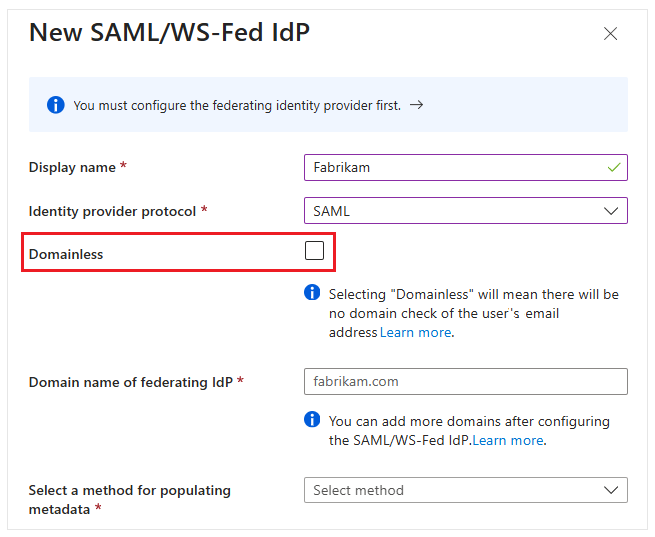
You can also switch an existing SAML IdP to domainless federation by editing the domain configuration and selecting the Domainless checkbox from there.
Important: When domainless is enabled, only one domainless IdP can be configured per tenant. Think of it as a wildcard IdP — it catches anything that matches the Issuer URI.
Inviting guest users with domainless federation#
Once configured, you can invite guest users as you normally would. The email domain doesn’t need to match a verified domain in your tenant. There is one catch though: you need to include a domain_hint parameter in the invitation redirect URL. The value must match the Issuer URI defined in your SAML IdP configuration. This is how Entra knows which IdP to route the user to.
The user flow looks like this:
- Invite the guest user by email — any email domain works
- The user redeems the invitation; Entra uses the
domain_hintto route to the right IdP - The user authenticates with the external SAML IdP
- On subsequent sign-ins, the user object already has the IdP association stored, so it just works
Known issue#
There’s one known issue worth mentioning: the IdP configuration gets deleted if an invalid domain name is entered during setup, even if the configuration hasn’t been saved yet. Microsoft is actively working on a fix, so keep an eye on the documentation for updates.
Wrap up#
This is a welcome addition for organizations that deal with B2B scenarios where partners don’t have clean domain alignment between their IdP and their users’ email addresses. It’s a relatively niche scenario, but if you’ve been bitten by AADSTS5000819, you’ll know exactly how frustrating it can be.
For the full documentation, check out Add a SAML/WS-Fed identity provider on Microsoft Learn.
Note (May 2026): The Domainless checkbox may not yet be visible in the portal depending on your tenant’s rollout state. The Graph API beta endpoint already accepts the
isIssuerUriValidationEnabledproperty, so configuration via API is possible in the meantime.
Comments
Comments load when you scroll here.