
Admin control for SSO prompts in Windows; finally, an off switch!
If you’ve been paying attention to the EEA sign-in changes over the past while, you’ll know Microsoft started prompting users before reusing their Windows credentials to sign in to other Microsoft apps and services. Good for user choice, less great if you’re an admin who just spent years getting SSO working and now watches it ask permission every time.
Well, Microsoft just published a new doc that gives that control back to admins: Admin control for SSO prompts in Windows. Let’s dig in.
Background: what changed and why#
Quick recap for anyone who missed it. In the European Economic Area, Windows no longer automatically signs users into other Microsoft apps and services after they sign in to Windows itself. Instead, the first time a user opens an app that supports sign-in with a personal Microsoft account or a work/school Entra ID account, they get this:
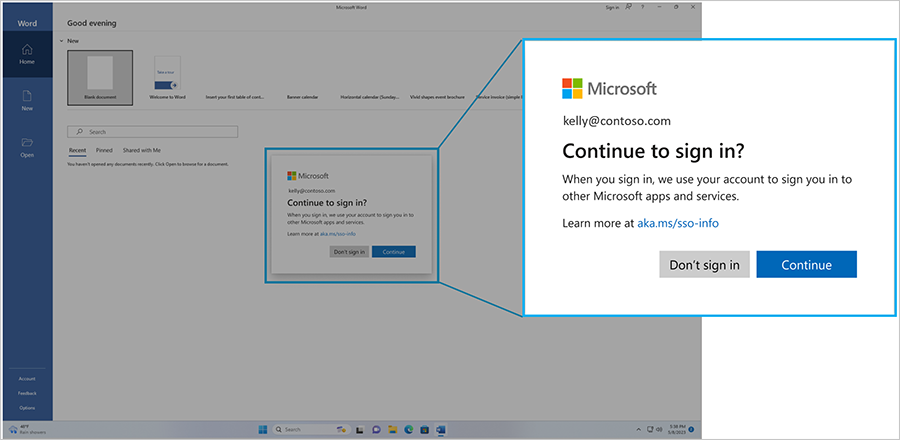
Once the user picks “Continue,” it won’t ask again for that app. Reasonable from a privacy standpoint, but for managed enterprise environments where you already control sign-in policy and trust relationships, this prompt is mostly just noise. You’ve already decided how sign-in works on these devices; you don’t need Windows to ask the end user again.
Microsoft heard that feedback, and this new doc lays out the fix.
The new registry control#
Starting with the July 2026 security update ( KB5101650) for Windows 11 24H2 and 25H2, you can set a registry value to automatically accept the SSO prompt on managed devices:
Registry path:
HKLM\SOFTWARE\Policies\Microsoft\Windows\AADValue:AutoAcceptSsoPermission(DWORD) =1
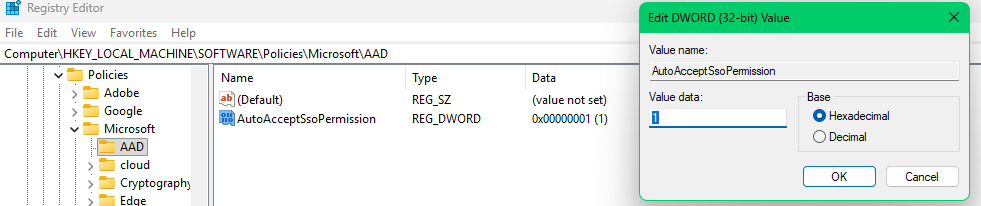
Set it, and the prompt stops appearing; Windows just goes ahead and reuses the Windows sign-in for other Microsoft apps, the way it used to.
What this does and doesn’t cover#
Before you go roll this out tenant-wide, know the boundaries:
- ✅ Applies only to managed Windows devices with Entra ID accounts. This is the scenario it’s built for.
- ❌ Personal Microsoft accounts (MSA) still get the prompt. There’s no admin override for consumer accounts — makes sense, since there’s no “management” relationship to lean on there.
- ❌ Unmanaged devices are unaffected. If a device isn’t under policy control, the prompt stays. Again, logical — this is an admin control for admin-controlled devices.
- 📅 You need the July 2026 update. No update, no registry key, no effect.
So this isn’t a global bypass switch; it’s scoped exactly to the devices you already manage, which is exactly where you’d want that kind of control anyway.
How to roll it out#
Nothing exotic here, it’s a standard registry policy, so use whatever you’re already using to manage Windows configuration:
- Group Policy (GPO)
- Microsoft Intune, or another MDM
- Microsoft Configuration Manager
- Any other tool that can push registry policies
My advice: don’t blanket-deploy this to your whole fleet in one go. Roll it out to a pilot group first, confirm the update is actually installed everywhere you expect, and validate SSO behavior before you push tenant-wide. It’s a small registry key, but it changes user-facing sign-in behavior, and those are exactly the kind of changes that generate helpdesk tickets if you get the rollout order wrong.
Wrapping up#
This is a good example of Microsoft striking a balance: keep the privacy-friendly default for end users, but give enterprise admins a documented, supported way to opt back into the old, frictionless behavior on devices they already control. If you rolled out the original EEA prompt change and got questions from your service desk about it, this is the doc to bookmark.
References:
- Admin control for SSO prompts in Windows – Microsoft Learn
- Upcoming changes to Windows single sign-on – Microsoft Tech Community
- aka.ms/sso-info
- The long awaited DMA-SSO Admin Controls! - Joey Verlinden
- Now available: Admin control for SSO prompts in Windows
Stay safe!
Comments
Comments load when you scroll here.